Guide to Using PVA and HIPS Breakaway Support Filaments
FDM printing requires support structures to print overhangs steeper than 45 degrees. However, standard support printed in the same material fuses to the model, leaving rough surface scars upon removal. Slicing with dual extruders allows you to use dedicated support interface filaments—like water-soluble PVA or breakaway HIPS—to print zero-clearance supports that wash or peel away, leaving a perfect surface finish.
Soluble Supports: PVA vs. HIPS
Compare the two primary support materials:
- PVA (Polyvinyl Alcohol): A water-soluble polymer. It is used alongside **PLA** since they print at similar temperatures (190°C–210°C). Once printed, submerge the part in warm water, and the PVA supports will dissolve completely, leaving no blemishes. Highly hygroscopic.
- HIPS (High Impact Polystyrene): Soluble in d-Limonene chemical solvent. It is used alongside **ABS** since they print at high temperatures (240°C–250°C). HIPS breaks away easily or dissolves in a limonene bath.
Slicer Settings for Soluble Interfaces
To optimize print speeds, do not print the entire support structure in soluble filament. Instead, configure your slicer to print the main support body in cheap PLA, and use the expensive PVA only for the **Support Interface Layers** (the 3 layers that touch the model). Set the Z-gap to 0mm. This supports the plastic perfectly, leaving a smooth surface.
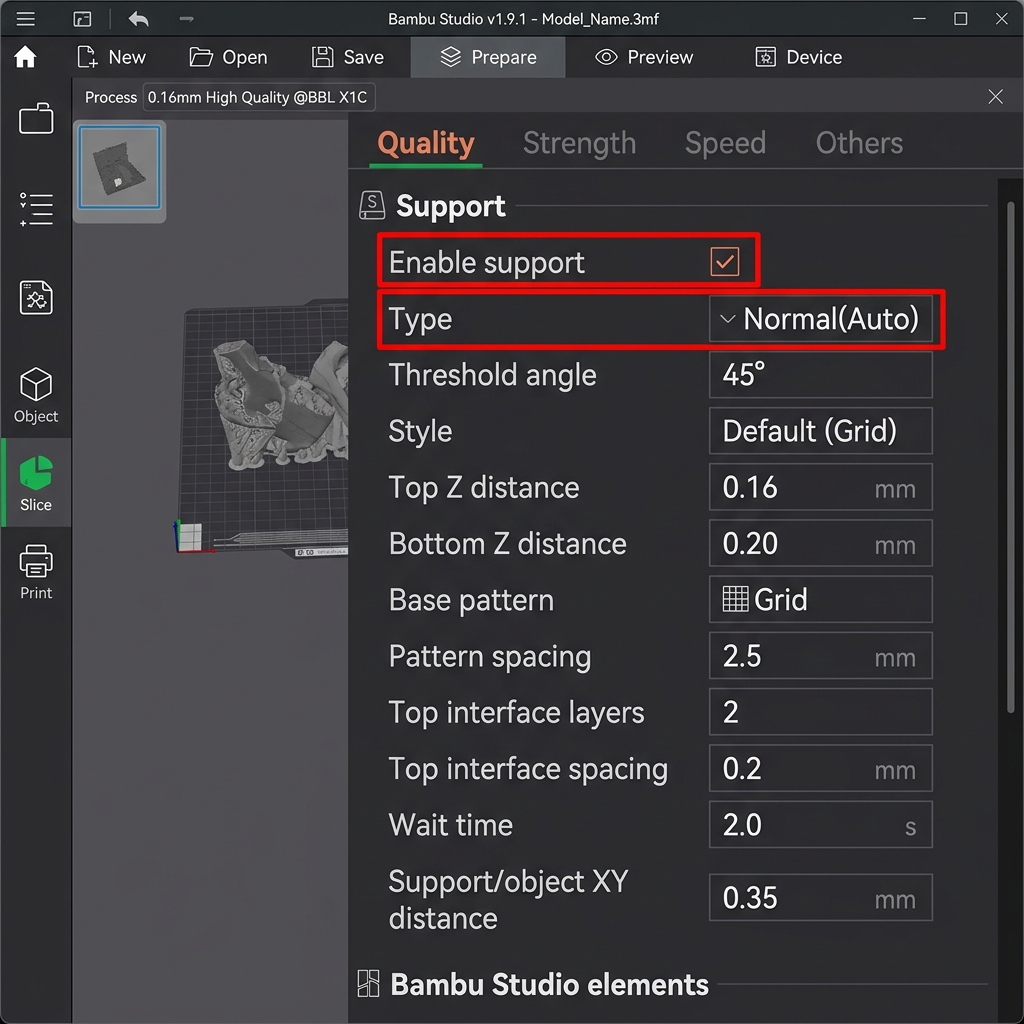
Enabling and configuring support settings in Bambu Studio (highlighted in red)
Support Strategies for DesignForge Templates
Our templates are optimized to print without supports, but interface materials can be used for custom setups:
- Modular Desk Nameplates: If your nameplate base has complex underside slots, use a **PVA interface** to print clean, flat horizontal slots. Wash the base in warm water to dissolve the support.
- Custom Keychains & Pet Tags: Sliced flat, keychains print without supports. Turn supports off.
- Cake Toppers: Slicing cake toppers flat requires zero supports. Ensure supports are disabled.
Recommended Print Settings for DesignForge Templates
To ensure high success rates and perfect visual finishes, use the following tested print profiles for our 3D nameplate, keychain, pet tag, and cake topper templates. Adjust your temperatures based on your specific filament manufacturer recommendations.
| Design Type | Filament Type | Layer Height | Infill Profile | Wall Count | Nozzle/Bed Temp | Slicer Optimization & Finish |
|---|---|---|---|---|---|---|
| Nursery Desk Nameplate | PLA | 0.20mm base / 0.12mm text | 15% Gyroid | 3 Walls | 200°C / 60°C | Enable variable layer height on letters; 100% cooling. |
| Teacher Desk Nameplate | PLA or PETG | 0.20mm | 15% Gyroid | 3 Walls | 200°C (PLA) / 240°C (PETG) | Enable Ironing on topmost surfaces only (30mm/s, 10% flow). |
| Kids Desk Nameplate | PLA | 0.20mm | 20% Gyroid | 3 Walls | 200°C / 60°C | Use multi-color pauses at layer transitions for colored letters. |
| Custom Keychain | PETG or TPU | 0.16mm | 30% Gyroid | 3 Walls | 240°C (PETG) / 225°C (TPU) | Slow down outer walls to 40mm/s for small keyring loop strength. |
| Custom Pet Tag | PETG | 0.16mm | 40% Grid | 4 Walls | 240°C / 75°C | Disable Z-hop to reduce fine hair stringing inside small letters. |
| Cake Topper | Food-Grade PLA | 0.20mm | 25% Concentric | 4 Walls | 200°C / 60°C | Coat prong with food-safe epoxy sealant. Avoid supports. |
Expert 3D Printer's Checklist
Before launching any complex print, run through this quick checklist to ensure maximum success and reduce print failures:
- Bed Leveling: Confirm your bed is trammed and that your Z-offset is dialed in with no visible gaps. Run an auto-level mesh before printing large flat objects.
- Filament Drying: Ensure your spool has been kept dry and stored in a sealed container with active silica desiccant. If printing PETG or TPU, pre-dry the filament.
- Build Plate Adhesion: Wipe down the PEI bed surface with 99% Isopropyl Alcohol (IPA) to dissolve finger oils. Do not use acetone on PEI plates.
- First Layer Inspection: Watch the first layer print completely to verify that the bead line is squishing down nicely and anchoring to the plate.
- Slicer Profile: Check that you have configured the appropriate infill pattern (like Gyroid) and turned off supports for flat items.
- Temperature Calibration: Set your hotend and bed temperatures exactly as recommended for your specific filament brand and polymer type.
- Cooling Fan Speed: Keep the part-cooling fan turned off on the first layer to prevent warping, and set it to 100% on subsequent layers for PLA.
Comprehensive 3D Printing Reference Guide
To help you get the best possible results from the DesignForge STL and 3MF generators, we have compiled a detailed reference guide covering troubleshooting, settings, and material handling. Refer to this matrix when configuring your slicer software (such as Bambu Studio, OrcaSlicer, PrusaSlicer, or Cura).
Ultimate 3D Printing Troubleshooting Matrix
| Issue | Primary Cause | Recommended Solution |
|---|---|---|
| Warping / Corner Lifting | Thermal contraction as plastic cools; poor bed adhesion. | Clean build plate with dish soap; increase bed temperature by 5°C; add a 5mm brim; disable drafts. |
| Stringing / Oozing | Wet filament or incorrect retraction settings. | Dry the filament spool; increase retraction distance by 0.5mm; enable travel moves wipe; lower nozzle temp by 5°C. |
| Under-Extrusion | Clogged nozzle, cracked extruder arm, or low flow rate. | Perform a cold pull to clear clogs; check extruder gears; calibrate extruder E-steps; increase extrusion multiplier. |
| Ghosting / Ringing | Frame vibrations at high printing speeds. | Tighten printer belts; place the printer on a heavy, stable surface; reduce acceleration settings or enable input shaping. |
| Pillowing (Top Surface Holes) | Insufficient top layers or poor cooling. | Increase top solid layers to at least 4; increase cooling fan speed; increase infill density. |
Material Profiles & Settings Reference
Every filament type has different temperature profiles and mechanical properties. Use the table below as a starting point:
| Filament | Nozzle Temp | Bed Temp | Cooling Fan | Key Properties |
|---|---|---|---|---|
| PLA (Polylactic Acid) | 190°C - 220°C | 50°C - 60°C | 100% | Easy to print, biodegrades, minimal warping, rigid, brittle. |
| PETG | 230°C - 250°C | 70°C - 80°C | 30% - 50% | Durable, chemically resistant, UV resistant, prone to stringing. |
| ABS (Acrylonitrile Butadiene Styrene) | 240°C - 260°C | 90°C - 110°C | 0% - 20% | High heat resistance, tough, can be acetone smoothed; requires enclosure. |
| ASA (Acrylic Styrene Acrylonitrile) | 240°C - 260°C | 90°C - 110°C | 0% - 20% | Highly UV & weather resistant, ideal for outdoor parts; requires enclosure. |
| TPU (Thermoplastic Polyurethane) | 220°C - 240°C | 40°C - 60°C | 80% - 100% | Highly flexible, rubber-like, impact resistant; print slowly (15-30mm/s). |
Manifold Design & CAD Best Practices
For custom nameplates and keychains to slice correctly in your 3D printing software, they must have watertight (manifold) geometries. Non-manifold geometry occurs when a model contains open edges, self-intersecting faces, or zero-thickness walls. The DesignForge generator utilizes boolean operations at the code level to merge base plates and letter fonts, ensuring perfect manifold geometry in all downloaded STL and 3MF files. When designing custom parts in CAD programs like Fusion 360, SolidWorks, or OpenSCAD:
- Always use Boolean Joins: Ensure overlapping bodies are combined using union operations before exporting.
- Keep minimum wall thickness: Wall features should be at least two times your nozzle diameter (e.g., at least 0.8mm for a 0.4mm nozzle) to prevent gaps.
- Avoid Zero-Thickness Geometry: Avoid faces that share an edge without a joining volume, as this confuses slicer software pathing algorithms.
Slicer Optimization Guidelines
When preparing your files in Bambu Studio, OrcaSlicer, PrusaSlicer, or Cura, apply these techniques for premium quality:
- Ironing: Enabling ironing runs the nozzle slowly over flat surfaces without extrusion to smooth out ridges. Recommended settings: Ironing speed of 30mm/s, flow rate of 10%-15%.
- Monotonic Fill Pattern: Forces parallel top lines to print in a single direction, eliminating light reflection variations and giving nameplates a uniform surface finish.
- Multi-Color Painting in Slicer: If you download our 3MF files, the color metadata is pre-assigned. You can customize coloring by selecting the "Paint Bucket" tool in Bambu Studio or OrcaSlicer, choosing your colors, and clicking the individual extruded letter blocks to color them instantly before sending to your multi-material system (like the Bambu AMS or Prusa MMU). Learn more about this in our Multi-Color 3D Printing Guide.