Ultimate Guide to Fixing Bed Adhesion and Warping in 3D Prints
Warping is one of the most frustrating failures in 3D printing. It occurs when the corners or edges of a 3D print curl upward and lift off the build surface. The root cause is thermal contraction: as molten plastic cools from extrusion temperature down to room temperature, it contracts and shrinks. This shrinkage creates internal mechanical tension. For large flat parts, these forces accumulate and pull the corners off the bed. To prevent warping, you must control the cooling rates and maximize build plate adhesion.
Practical Solutions to Stop Warping
Here are the industry-standard, real-world solutions to keep your prints flat:
1. Use Slicer Brims or "Mouse Ears"
- Outer Brims: Adding a 5mm to 10mm single-layer brim around your model significantly increases its bed surface area, helping distribute the peeling forces evenly.
- Mouse Ears (Adhesion Discs): If you want to avoid cleaning up a full brim around the entire print, use "Mouse Ears". These are small, circular helper discs placed specifically at the corners of your model in slicers like OrcaSlicer, Bambu Studio, or PrusaSlicer. They provide maximum hold where warping forces concentrate, but are incredibly easy to snap off after printing.
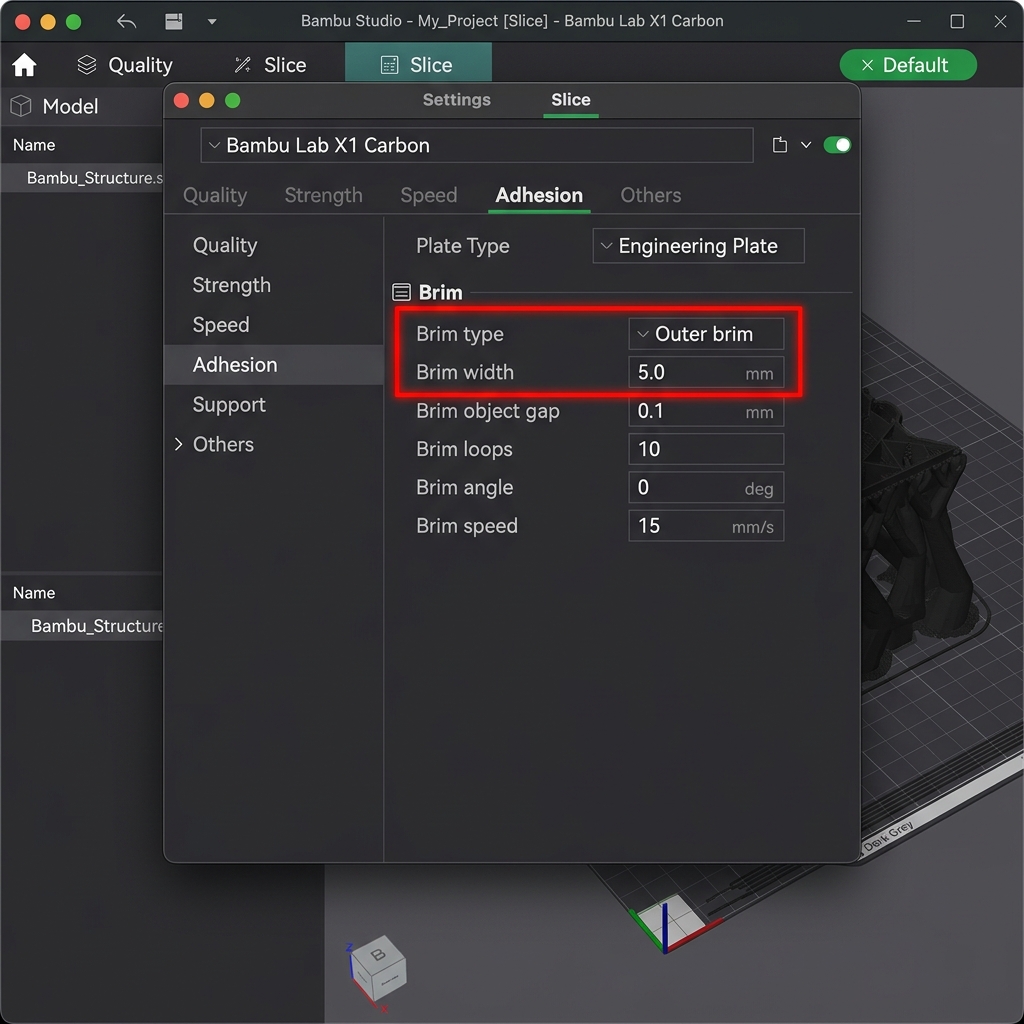
Bambu Studio Brim and Mouse Ears settings panel (under the Others/Adhesion tab)
2. Optimize Bed Temperatures & Z-Offset Squish
- Stay Near Glass Transition (Tg): Keep the print bed temperature just below the glass transition point of your polymer (60°C for PLA, 80°C for PETG). This keeps the bottom layers slightly rubbery, which relieves internal thermal stresses without causing the print to sag.
- Dial in the Z-Offset: You want a healthy "first-layer squish." If the nozzle is too far from the bed, the extruded filament rests like cylinders rather than being pressed flat into the micro-textures of the build plate. Use your printer's live baby-stepping to lower the Z-offset in 0.01mm increments until the lines merge cleanly with no gaps.
3. Control Part Cooling & Environmental Drafts
- Disable Fan on Early Layers: Keep the part-cooling fan turned off for the first 2 to 3 layers. Fast cooling of early layers causes instant contraction, triggering warping.
- Eliminate Drafts & Keep Ambient Heat: Air conditioning vents, fans, or open windows are the enemies of flat prints. A draft of cool air will cause immediate uneven shrinkage. Use a draft shield in your slicer or place your printer inside an enclosure. Enclosures are mandatory for ABS, ASA, and Nylon.
4. Adhesion Aids (Glue Sticks & Clean PEI)
- Glue Stick & Hair Spray: A thin, uniform layer of PVA glue stick or specialized 3D printing adhesive serves as a bonding layer. It also serves as a release agent for PETG and TPU on smooth glass/PEI surfaces, preventing the plastics from fusing and tearing out chunks of the bed when removed.
- Isopropyl Alcohol (IPA): Wipe down your PEI bed with 99% IPA before every print to dissolve fresh oils.
Warping Mitigation on DesignForge Templates
Our flat designs are highly susceptible to warping due to their geometry:
- Nursery, Kids, & Teacher Nameplates: These feature wide, rectangular base footprints. Always print nameplates on a cleaned, textured PEI sheet at 60°C (PLA). If printing in PETG, use a 5mm brim or add circular mouse ears to the four corners of the baseplate.
- Custom Keychains & Pet Tags: Keychains are small, so they rarely warp. However, if printing multiple keychains simultaneously on a single bed, space them at least 20mm apart to allow the cooling fan to blow evenly, preventing hot air pockets.
- Cake Toppers: Cake toppers have long, thin shapes. Use a brim on the insert stick prong to keep it anchored to the bed, preventing it from lifting and colliding with the nozzle.
Recommended Print Settings for DesignForge Templates
To ensure high success rates and perfect visual finishes, use the following tested print profiles for our 3D nameplate, keychain, pet tag, and cake topper templates. Adjust your temperatures based on your specific filament manufacturer recommendations.
| Design Type | Filament Type | Layer Height | Infill Profile | Wall Count | Nozzle/Bed Temp | Slicer Optimization & Finish |
|---|---|---|---|---|---|---|
| Nursery Desk Nameplate | PLA | 0.20mm base / 0.12mm text | 15% Gyroid | 3 Walls | 200°C / 60°C | Enable variable layer height on letters; 100% cooling. |
| Teacher Desk Nameplate | PLA or PETG | 0.20mm | 15% Gyroid | 3 Walls | 200°C (PLA) / 240°C (PETG) | Enable Ironing on topmost surfaces only (30mm/s, 10% flow). |
| Kids Desk Nameplate | PLA | 0.20mm | 20% Gyroid | 3 Walls | 200°C / 60°C | Use multi-color pauses at layer transitions for colored letters. |
| Custom Keychain | PETG or TPU | 0.16mm | 30% Gyroid | 3 Walls | 240°C (PETG) / 225°C (TPU) | Slow down outer walls to 40mm/s for small keyring loop strength. |
| Custom Pet Tag | PETG | 0.16mm | 40% Grid | 4 Walls | 240°C / 75°C | Disable Z-hop to reduce fine hair stringing inside small letters. |
| Cake Topper | Food-Grade PLA | 0.20mm | 25% Concentric | 4 Walls | 200°C / 60°C | Coat prong with food-safe epoxy sealant. Avoid supports. |
Expert 3D Printer's Checklist
Before launching any complex print, run through this quick checklist to ensure maximum success and reduce print failures:
- Bed Leveling: Confirm your bed is trammed and that your Z-offset is dialed in with no visible gaps. Run an auto-level mesh before printing large flat objects.
- Filament Drying: Ensure your spool has been kept dry and stored in a sealed container with active silica desiccant. If printing PETG or TPU, pre-dry the filament.
- Build Plate Adhesion: Wipe down the PEI bed surface with 99% Isopropyl Alcohol (IPA) to dissolve finger oils. Do not use acetone on PEI plates.
- First Layer Inspection: Watch the first layer print completely to verify that the bead line is squishing down nicely and anchoring to the plate.
- Slicer Profile: Check that you have configured the appropriate infill pattern (like Gyroid) and turned off supports for flat items.
- Temperature Calibration: Set your hotend and bed temperatures exactly as recommended for your specific filament brand and polymer type.
- Cooling Fan Speed: Keep the part-cooling fan turned off on the first layer to prevent warping, and set it to 100% on subsequent layers for PLA.
Comprehensive 3D Printing Reference Guide
To help you get the best possible results from the DesignForge STL and 3MF generators, we have compiled a detailed reference guide covering troubleshooting, settings, and material handling. Refer to this matrix when configuring your slicer software (such as Bambu Studio, OrcaSlicer, PrusaSlicer, or Cura).
Ultimate 3D Printing Troubleshooting Matrix
| Issue | Primary Cause | Recommended Solution |
|---|---|---|
| Warping / Corner Lifting | Thermal contraction as plastic cools; poor bed adhesion. | Clean build plate with dish soap; increase bed temperature by 5°C; add a 5mm brim; disable drafts. |
| Stringing / Oozing | Wet filament or incorrect retraction settings. | Dry the filament spool; increase retraction distance by 0.5mm; enable travel moves wipe; lower nozzle temp by 5°C. |
| Under-Extrusion | Clogged nozzle, cracked extruder arm, or low flow rate. | Perform a cold pull to clear clogs; check extruder gears; calibrate extruder E-steps; increase extrusion multiplier. |
| Ghosting / Ringing | Frame vibrations at high printing speeds. | Tighten printer belts; place the printer on a heavy, stable surface; reduce acceleration settings or enable input shaping. |
| Pillowing (Top Surface Holes) | Insufficient top layers or poor cooling. | Increase top solid layers to at least 4; increase cooling fan speed; increase infill density. |
Material Profiles & Settings Reference
Every filament type has different temperature profiles and mechanical properties. Use the table below as a starting point:
| Filament | Nozzle Temp | Bed Temp | Cooling Fan | Key Properties |
|---|---|---|---|---|
| PLA (Polylactic Acid) | 190°C - 220°C | 50°C - 60°C | 100% | Easy to print, biodegrades, minimal warping, rigid, brittle. |
| PETG | 230°C - 250°C | 70°C - 80°C | 30% - 50% | Durable, chemically resistant, UV resistant, prone to stringing. |
| ABS (Acrylonitrile Butadiene Styrene) | 240°C - 260°C | 90°C - 110°C | 0% - 20% | High heat resistance, tough, can be acetone smoothed; requires enclosure. |
| ASA (Acrylic Styrene Acrylonitrile) | 240°C - 260°C | 90°C - 110°C | 0% - 20% | Highly UV & weather resistant, ideal for outdoor parts; requires enclosure. |
| TPU (Thermoplastic Polyurethane) | 220°C - 240°C | 40°C - 60°C | 80% - 100% | Highly flexible, rubber-like, impact resistant; print slowly (15-30mm/s). |
Manifold Design & CAD Best Practices
For custom nameplates and keychains to slice correctly in your 3D printing software, they must have watertight (manifold) geometries. Non-manifold geometry occurs when a model contains open edges, self-intersecting faces, or zero-thickness walls. The DesignForge generator utilizes boolean operations at the code level to merge base plates and letter fonts, ensuring perfect manifold geometry in all downloaded STL and 3MF files. When designing custom parts in CAD programs like Fusion 360, SolidWorks, or OpenSCAD:
- Always use Boolean Joins: Ensure overlapping bodies are combined using union operations before exporting.
- Keep minimum wall thickness: Wall features should be at least two times your nozzle diameter (e.g., at least 0.8mm for a 0.4mm nozzle) to prevent gaps.
- Avoid Zero-Thickness Geometry: Avoid faces that share an edge without a joining volume, as this confuses slicer software pathing algorithms.
Slicer Optimization Guidelines
When preparing your files in Bambu Studio, OrcaSlicer, PrusaSlicer, or Cura, apply these techniques for premium quality:
- Ironing: Enabling ironing runs the nozzle slowly over flat surfaces without extrusion to smooth out ridges. Recommended settings: Ironing speed of 30mm/s, flow rate of 10%-15%.
- Monotonic Fill Pattern: Forces parallel top lines to print in a single direction, eliminating light reflection variations and giving nameplates a uniform surface finish.
- Multi-Color Painting in Slicer: If you download our 3MF files, the color metadata is pre-assigned. You can customize coloring by selecting the "Paint Bucket" tool in Bambu Studio or OrcaSlicer, choosing your colors, and clicking the individual extruded letter blocks to color them instantly before sending to your multi-material system (like the Bambu AMS or Prusa MMU). Learn more about this in our Multi-Color 3D Printing Guide.

Bambu Studio Ironing settings panel (under the Quality/Ironing tab)